
Built by an ISP,
for ISPs.
Hotspot and PPPoE billing, network control and subscriber self-service. Your customers pay with mobile money, straight into your own account, and FyberPay turns their internet on.
KES 10 per subscriber a month · 3% of hotspot sales · KES 500 minimum · 30 days free, no card.
From M-Pesa to online, without you in the middle.
- 01M-PESAPay KES 50 to Acme Wi-Fi?••••
- 02Payment receivedSKL4X7Q20712 ••• 431KES 50Invoice INV-0412
- 03MikroTik · RADIUSauth 0712•••431Access-Acceptrate-limit 10M/10Msession started
- 04Waiting
They pay
An M-Pesa prompt from your hotspot page or invoice, or your paybill with their phone number as the account. With your own account connected, the money lands there directly.
FyberPay matches it
The payment is tied to the right subscriber, the receipt is recorded and the invoice closes. Nobody matches codes by hand.
Your router lets them in
FyberPay tells your MikroTik or TP-Link Omada to open their plan at its speed, through RADIUS.
They are online
Usually within seconds, with an SMS receipt. No call to you, no voucher to type.
And when someone does not pay?
They get SMS reminders, then a page that lets them pay instead of a dead connection. The moment they pay, service comes back on its own.
Built from the questions ISPs send us every week.
“They paid. Why aren’t they online?”
Every payment is tied to the subscriber who made it, with their live session beside it, so you can answer in one look. FyberPay also checks your router and flags the most common cause of “connected, no internet”: a missing NAT rule, with a fix you apply in one click.
- Payment
- KES 50Matched
- Internet
- connected, no trafficNo internet
“Where’s my money?”
You can have every payment go straight to your own account: your own M-Pesa paybill, or your own KopoKopo, Paystack, Tuma or bank account. FyberPay records each payment against the right subscriber with its receipt, so what you see matches your own statement.
“I find out the network is down from my customers.”
FyberPay watches every router and OLT, records loss and latency on your uplink, and tells you when something drops. When a fibre is cut, mark the outage and text the subscribers it affects, then tell them when it is back.
| Device | Latency | Loss |
|---|---|---|
| Core · CCR2116 | 2 ms | 0% |
| OLT 1 · 48 ONTs | 5 ms | 0% |
| Ruaka tower · PPPoE | 14 ms | 0% |
| Kahawa · 3 Omada APs | 7 ms | 0% |
“Every Wi-Fi password change is a trip.”
Connect your ONTs and routers through TR-069 and subscribers change their own Wi-Fi name and password from their portal. You see each ONT’s status, signal and connected devices, and manage OLTs directly (Huawei) or through SmartOLT.
Screens show demo data.
- MikroTik RouterOS 7.13+/
- TP-Link Omada/
- Huawei OLT/
- SmartOLT/
- TR-069/
- M-Pesa Daraja/
- Bill Manager/
- KopoKopo/
- Paystack/
- Bank paybills/
Three steps to your first sale.
Running RouterOS 6? FyberPay walks you through the upgrade first. Stuck on any step, message us and a person helps you finish. Guides: setup docs · Omada hotspot video.
- 01
Create your account
30 days free and no card. You get your own FyberPay address for your team and subscribers.
- 02
Connect your router
Paste one command into your MikroTik (RouterOS 7.13 or newer), or add your TP-Link Omada access point. Users already on the MikroTik? Import them and match their profiles to plans.
Winbox · New Terminal[admin@MikroTik] >Illustration. Your command is unique to your router.
- 03
Add plans and start selling
Hotspot packages by time, PPPoE plans by speed. Customers pay on M-Pesa and FyberPay does the rest.
KES 10 per subscriber a month.
One flat rate for every PPPoE, static and named hotspot subscriber, with no volume tiers. Hotspot sales cost 3%, billed once a month, not taken from each sale. The monthly minimum is KES 500, and your first 30 days are free.
What you would pay
Everything is included
- Hotspot captive portal and vouchers
- PPPoE, static IP and RADIUS
- M-Pesa prompts, paybill and Bill Manager
- SMS reminders and receipts
- Pay page for unpaid subscribers
- Subscriber portal and app
- Router, OLT and uplink monitoring
- TR-069 Wi-Fi management
- Outage notices to affected subscribers
Asked before signing up.
Something not here? Ask us on WhatsApp.
Pricing
How much does FyberPay cost?
KES 10 per subscriber a month, flat, with no volume tiers, plus 3% of hotspot sales billed once a month. The monthly minimum is KES 500. Everything is included: billing, M-Pesa, RADIUS, the captive portal, SMS reminders, the subscriber portal and network monitoring.
Is there a free trial?
Yes. Your first 30 days are free and you do not need a card to start.
Who counts as a billable subscriber?
Every PPPoE, static IP and named hotspot login you have set up, including subscribers who are behind on payment. Logins you pause yourself do not count. Anonymous voucher buyers are covered by the hotspot percentage, not the per-subscriber rate.
Can payments go straight to my own account?
Yes. Connect your own M-Pesa paybill, or your own KopoKopo, Paystack, Tuma or bank account, and every payment can go straight there. FyberPay records each payment, matches it to the subscriber and turns their service on. You pay FyberPay separately, one monthly bill: the per-subscriber rate and 3% of hotspot sales.
Payments
Where do my customers’ payments go?
Wherever you connect. With your own M-Pesa paybill (through your Daraja credentials), or your own KopoKopo, Paystack, Tuma or bank paybill account, every payment lands there directly.
How do my subscribers pay?
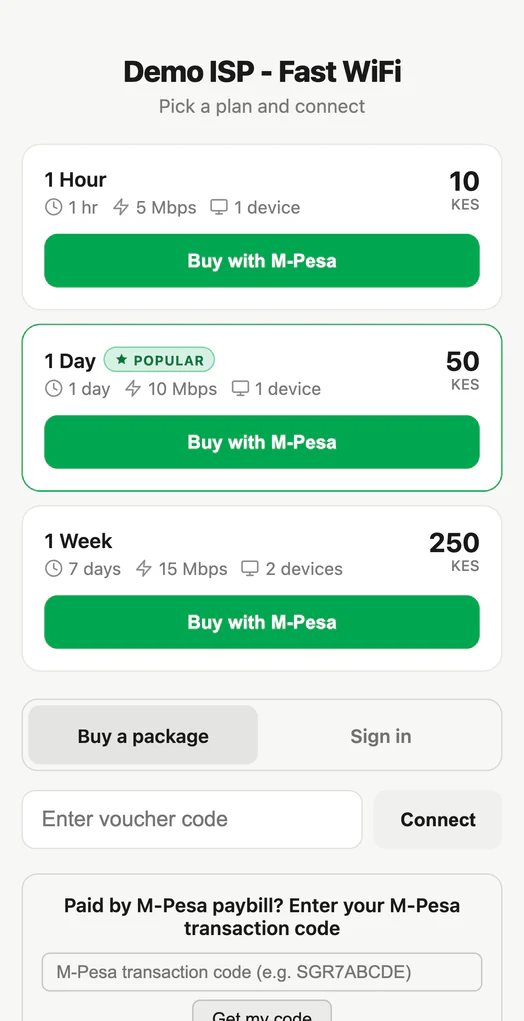
Hotspot customers pay from the login page with an M-Pesa prompt. PPPoE subscribers pay your paybill from any invoice or reminder SMS using their own phone number as the account number, so it works even when they are cut off. The subscriber portal also offers the M-Pesa prompt and cards.
Which payment methods can I accept?
M-Pesa through your own Daraja credentials (prompt and paybill) and Bill Manager, plus KopoKopo, Paystack for cards, Tuma and bank paybills, each on your own account. You can run more than one at the same time. Billing is in Kenyan shillings.
How do I check FyberPay against my own statement?
Every payment is stored with its reference (the M-Pesa receipt number for M-Pesa payments) against the subscriber who made it, so each line in FyberPay matches a line in your own paybill or account statement.
What happens when a subscriber does not pay?
FyberPay sends the invoice before the due date and SMS reminders after it, then limits the connection to a page where they can pay, and finally suspends it if it is still unpaid. Every message carries the payment instructions, and service comes back on its own the moment they pay.
Setup and hardware
Which routers and devices does FyberPay work with?
MikroTik on RouterOS 7.13 or newer for PPPoE, hotspot and static IP; TP-Link Omada access points for hotspot; Huawei OLTs directly or any OLT through SmartOLT; and ONTs or home routers that speak TR-069. Older RouterOS 6 routers are walked through an upgrade first, though very small boards with 16 MB of storage cannot take it.
Do I need a MikroTik to run a hotspot?
No. A TP-Link Omada access point can sell Wi-Fi on its own: customers sign in with a voucher or pay by M-Pesa, and FyberPay handles the login.
Do I need a public IP address?
No. Your router connects out to FyberPay over an encrypted tunnel (SSTP or WireGuard), so it works behind NAT and on ordinary business lines.
How long does setup take?
Most of it is one command pasted into your MikroTik, or a few settings copied into your Omada access point. With your router and paybill ready, you can sell your first package the same day. If a step stalls, message us on WhatsApp and a person helps you finish.
Can I bring my existing subscribers?
Yes. Import the PPPoE users already on your MikroTik and match their profiles to FyberPay plans, so nobody has to be set up twice.
Your subscribers
Will my subscribers see FyberPay or my brand?
Your brand. You get your own address, your logo on invoices and the subscriber portal, and a captive portal in one of ten themes with your name on it.
What can subscribers do without calling me?
Pay, see invoices and receipts, change plan, raise a support ticket and, where their router is connected through TR-069, restart it and change their Wi-Fi name and password. It all works from the web portal and the Android and iOS app.
What messages do my subscribers get?
Receipts when they pay, reminders before and after the due date, and the notices you choose to send, such as an outage on their area and when it is fixed. SMS goes through your choice of 14 Kenyan and international SMS providers, and WhatsApp and email are available too.
Network and reliability
How does FyberPay tell me my network is down?
It checks every router and OLT, records packet loss and latency on your uplink, and alerts you when a device drops or degrades. When a fibre is cut you can mark the outage, text the subscribers it affects, and tell them when service is back.
What happens if FyberPay itself has a problem?
FyberPay runs on two separate sites, with the second kept ready to take over. Our live status is public at status.fyberpay.com.
Every payment, a connection.
Connect your router today and start selling. The first 30 days are on us.
That rack is ours. We show how ISPs are built, from racks to receipts, on TikTok.
Paid your internet provider and still offline?
Your account is with your provider. Restart your router, then contact them with the M-Pesa message you received. Their details are on your invoice and Wi-Fi login page.